Test Suites
The Test Suites window (Tools → Test Suites) is the management hub for Lua test scripts.
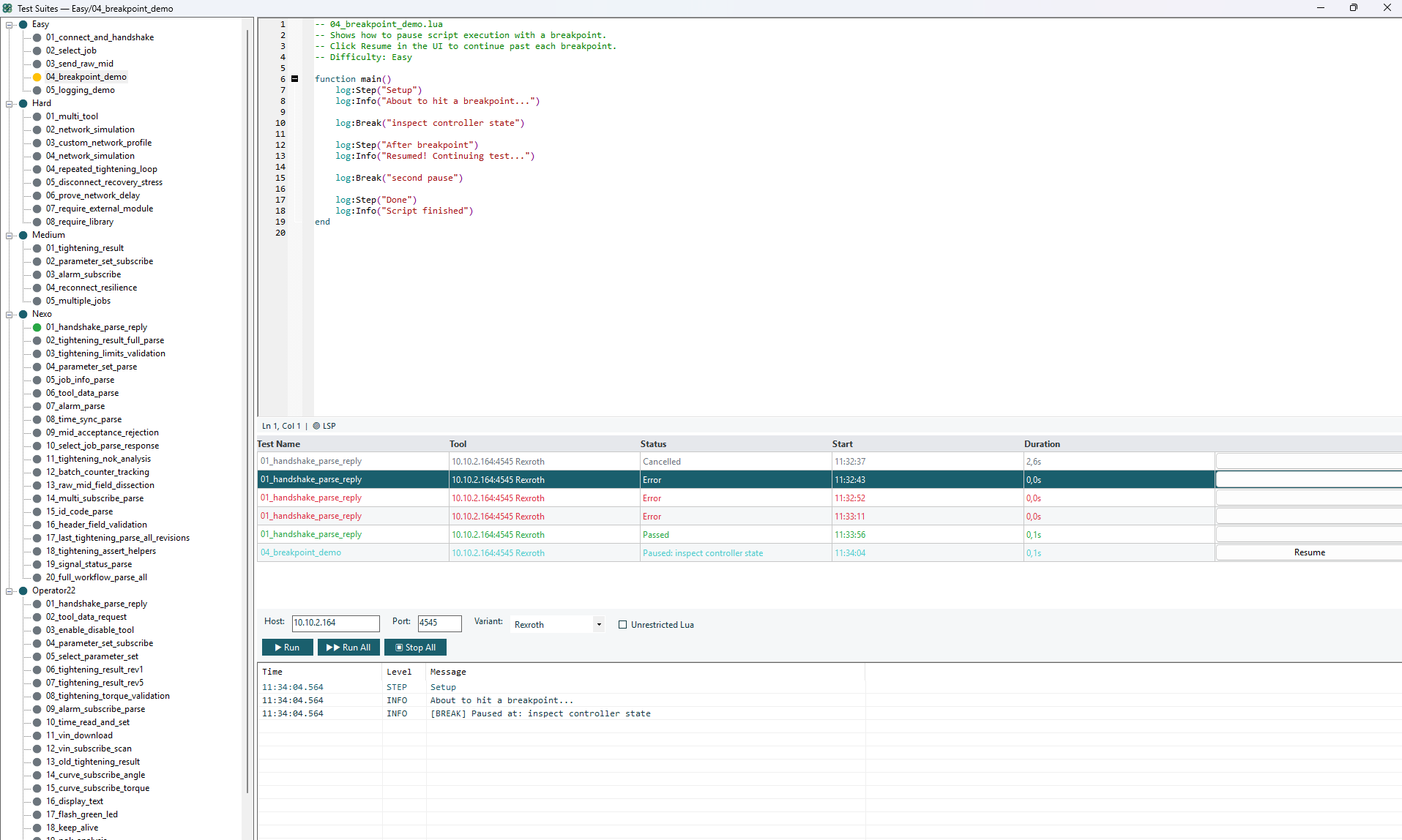
Window Layout
| Area | Description |
|---|---|
| Toolbar | Host, Port, Variant fields + Run/Stop/Report buttons |
| Tree panel (left) | Workspace and test hierarchy |
| Code editor (center) | Lua script editor with syntax highlighting and LSP diagnostics |
| Results panel (bottom) | Test step results, log output, duration |
Toolbar
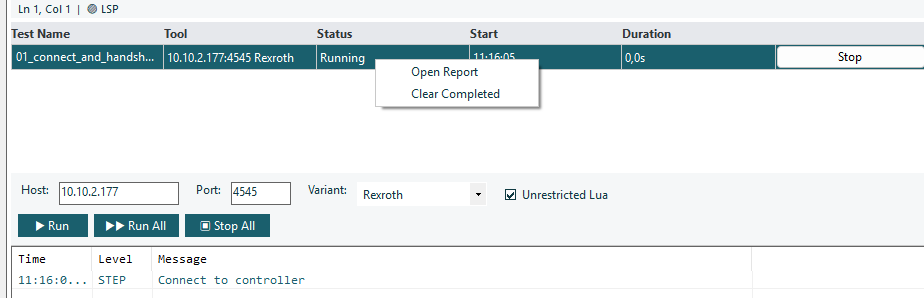
| Control | Description |
|---|---|
| Host | Controller hostname/IP for session:Connect() |
| Port | TCP port for session:Connect() |
| Variant | Protocol variant dropdown |
| Run | Execute the selected test |
| Run All | Execute all tests in the current workspace sequentially |
| Stop All | Cancel all running tests |
| Generate Report | Export results (HTML, JSON, JUnit XML) |
| Unrestricted Lua | Toggle sandbox mode for the workspace |
Workspaces
Tests are organized into workspaces (folders on disk). Right-click the tree to manage:
| Action | Description |
|---|---|
| New Workspace | Create a new test folder |
| Rename Workspace | Rename a workspace |
| Delete Workspace | Delete workspace and all its tests |
| New Test | Create a new Lua test script |
| Rename Test | Rename a test |
| Delete Test | Delete a test script |
| Import | Import .lua or .zip files into a workspace |
| Export | Export workspace as a .zip archive |
File Storage
Tests are stored at:
%APPDATA%\Haller + Erne GmbH\heOPTester\Tests\
├── MyWorkspace/
│   ├── test1.lua
│   ├── test1.lua.meta       ← metadata sidecar
│   ├── test2.lua
│   └── test2.lua.meta
Metadata Sidecar
Each test has an optional .lua.meta JSON file storing:
| Field | Description |
|---|---|
name | Display name |
description | Test description |
tags | Categorization tags |
defaultToolConfig | Override host/port/variant for this test |
lastResult | Last run status |
lastRun | Timestamp of last run |
runHistory | Last 20 run results |
Code Editor
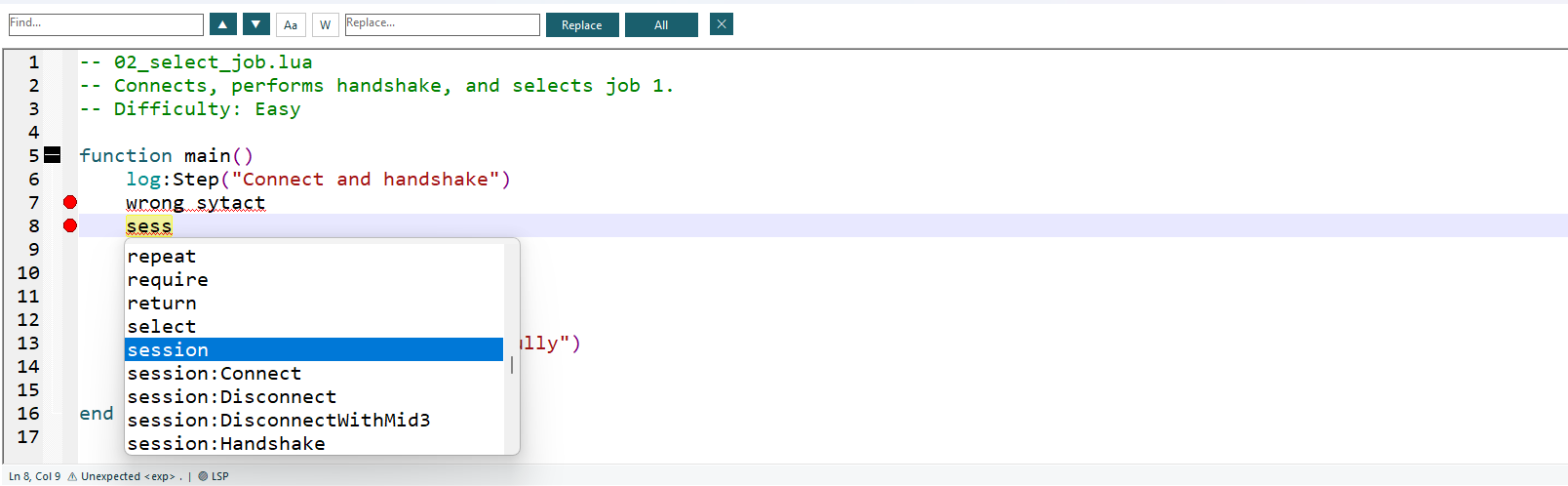
The editor features:
| Feature | Description |
|---|---|
| Syntax highlighting | Lua syntax coloring |
| Error markers | Red dots and underlines for syntax errors (from lua-language-server) |
| Autocomplete | Method/property suggestions for session, log, assert |
| Tooltips | Hover over API methods to see signatures and descriptions |
| Find/Replace | Ctrl+F for find, Ctrl+H for replace |
| Code folding | Collapse/expand function/if/for blocks |
| Status bar | Line/column, total lines, diagnostic message for current line |
LSP Setup
The editor uses lua-language-server for real-time diagnostics. The language server is installed automatically by the application installer — no manual setup is required.
Running Tests
Single Test
- Select a test in the tree
- Click Run (or right-click → Run)
All Tests in Workspace
- Select a workspace in the tree
- Click Run All
Concurrent Runs
Up to 5 tests can run simultaneously. Each gets its own TCP connection and log.
Test Status
| Status | Meaning |
|---|---|
| Running | Test is executing |
| Paused | Stopped at a log:Break() breakpoint |
| Passed | All steps completed without assertion failures |
| Failed | An assertion failed or a timeout occurred |
| Error | A Lua runtime error or unexpected exception |
| Cancelled | User clicked Stop |
Test Results

Each test run shows:
- Steps: Each
log:Step()call with its own pass/fail - Duration: Total execution time
- Log: Full log output (Info, Warn, Error, Debug messages)
Generating Reports
After running tests, click Generate Report to export:
| Format | Description |
|---|---|
| HTML | Human-readable report with color-coded log output |
| JSON | Machine-readable results with full log entries |
| JUnit XML | CI/CD integration (Jenkins, GitHub Actions) |
All formats include the complete log output from the test run.
Custom HTML Templates
Place a report_template.html at %APPDATA%\Haller + Erne GmbH\heOPTester\ with these placeholders:
| Placeholder | Replaced With |
|---|---|
{{TITLE}} | Report title |
{{GENERATED}} | Generation timestamp |
{{CONTENT}} | Test results HTML |
Creating Tests from Logs
- Capture traffic in the main log panel
- Go to Tools → Create Test from Log
- Configure:
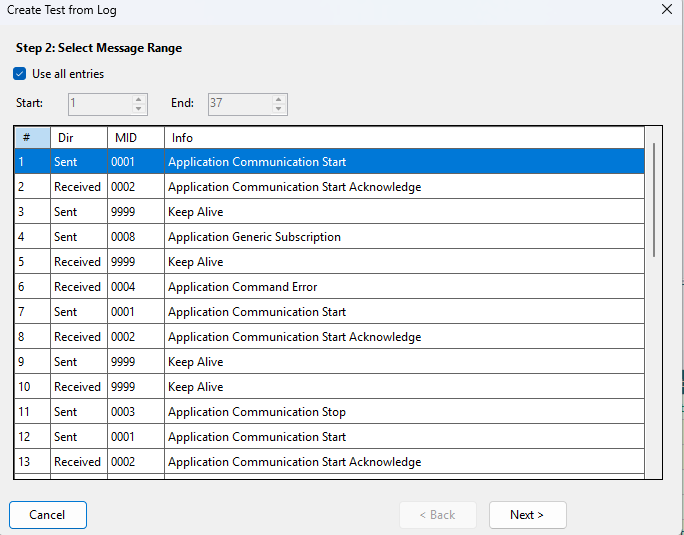
| Option | Description |
|---|---|
| Include assertions | Generate assert:Equals for responses |
| Include timing delays | Add timing comments |
| Default timeout | Timeout for WaitForMid() calls (default 5000ms) |
| Test name | Function name (defaults to main) |
- Preview the generated script
- Save to a workspace
The wizard automatically:
- Generates
Connect()+Handshake()from MID 0001/0002 pairs - Converts sent messages to
SendMid()orSendRaw() - Adds
WaitForMid()for responses - Detects disconnect/reconnect cycles
- Skips keep-alive messages (MID 9998/9999)