Lua Scripting
OpenProtocol Tester includes a built-in Lua scripting engine (MoonSharp) for writing automated test scripts that communicate with tightening controllers over TCP.
Overview
Scripts let you:
- Automate protocol handshakes and message sequences
- Validate tightening results against expected tolerances
- Run repeatable test suites across controller configurations
- Simulate network conditions for robustness testing
- Generate test reports (HTML, JSON, JUnit XML)
Quick Start
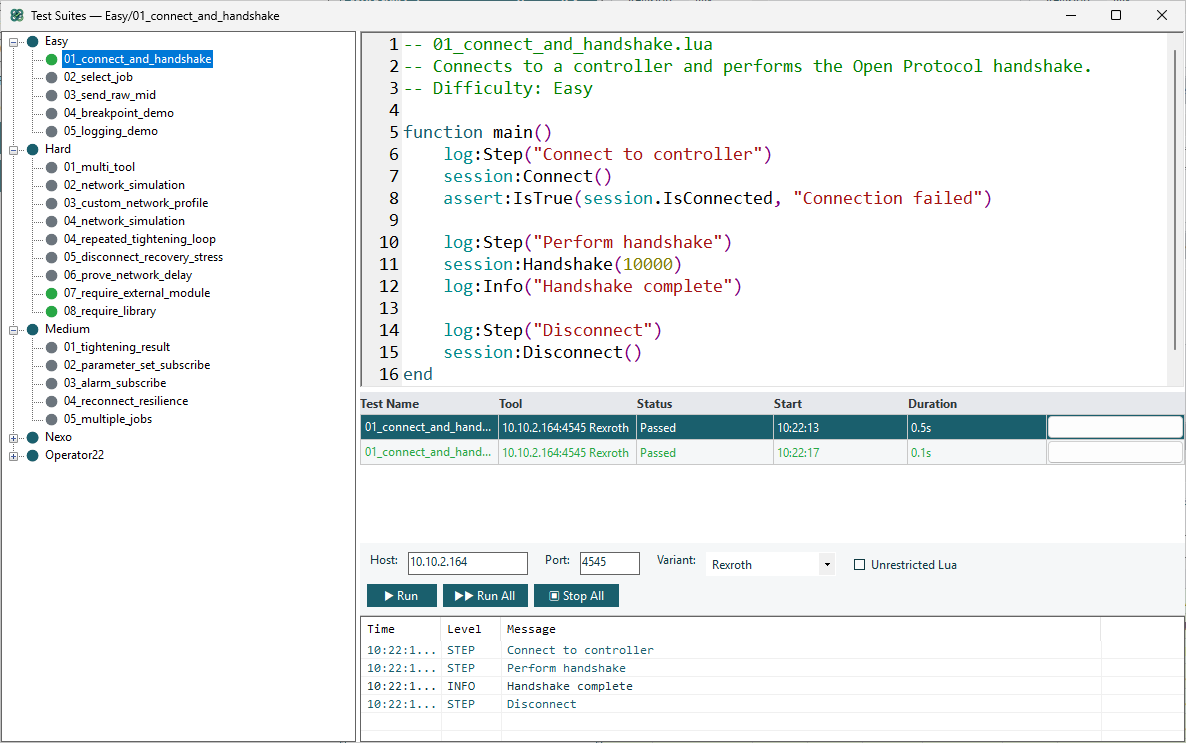
- Open Tools → Test Suites
- Right-click the tree → New Workspace → name it
- Right-click the workspace → New Test → name it
- Write your script:
function main()
    log:Step("Connect and handshake")
    session:Connect()
    session:Handshake()

    log:Step("Verify connection")
    assert:IsTrue(session.IsConnected, "Should be connected")

    log:Step("Disconnect")
    session:Disconnect()
end
- Set Host, Port, and Variant in the toolbar
- Click Run
Script Structure
Every script must define a function main() — this is the entry point the engine calls.
-- Helper functions go above main()
function myHelper()
    -- ...
end

-- Entry point (required)
function main()
    -- Your test logic here
end
Three Global Objects
Your scripts have access to three pre-injected globals:
| Global | Purpose |
|---|---|
session | TCP connection, send/receive messages, handshake |
assert | Test assertions (fail on mismatch) |
log | Logging, test steps, breakpoints |
Plus one global function:
createSession()— create an additional independent TCP session
Connecting
Default Connection (from toolbar)
session:Connect()           -- uses Host/Port/Variant from the toolbar
session:Handshake()         -- sends MID 0001, waits for MID 0002
Custom Connection
session:Connect("10.10.2.177", 4545, "OpenProtocol_Rexroth")
session:Handshake(15000)    -- 15 second timeout
Valid variant IDs:
"OpenProtocol_Rexroth"— Bosch Rexroth"OpenProtocol_BMW"— BMW"OpenProtocol_Ford"— Ford
Disconnecting
session:Disconnect()          -- hard TCP close
session:DisconnectWithMid3()  -- send MID 0003 first (clean protocol stop)
Auto-Reconnect
If the connection drops mid-test, the next send/wait call automatically reconnects and re-handshakes. No manual recovery code needed.
Sending Messages
By MID Number
session:SendMid(38)                     -- send MID 0038 with empty body
session:SendMid(38, { jobId = 12 })     -- send with body fields
With Header Control
By default, SendMid uses revision 1 and default header values. You can customize header fields:
-- Set persistent defaults for all subsequent sends
session:SetHeader({ revision = 3, station = "01", spindle = "02" })

session:SendMid(10)     -- uses revision 3, station 01, spindle 02

-- Per-call override (takes precedence over persistent defaults)
session:SendMid(10, nil, { revision = 1 })   -- revision 1, but station/spindle from SetHeader

-- Body fields AND header overrides together
session:SendMid(18, { ParameterSetId = "001" }, { revision = 1, noAck = 1 })

-- Clear persistent defaults (back to built-in: revision=1, station=00, ...)
session:ClearHeader()
Available header fields: revision, station, spindle, sequence, noAck, partCount, partNumber.
Raw ASCII
session:SendRaw("002400380010000000000000120000")
The NUL terminator (\0) is appended automatically.
Receiving Messages
Wait for a Specific MID
local resp = session:WaitForMid(5, 5000)   -- wait for MID 0005, 5s timeout
log:Info("Got MID " .. tostring(resp.mid))
Wait for Any Message
local msg = session:WaitForRawResponse(5000)
Non-Throwing Wait
local r = session:TryWaitForRawResponse(5000)
if r == nil then
    log:Info("No response within 5s")
end
Response Table
Every received message is a Lua table:
| Field | Type | Description |
|---|---|---|
mid | number | MID number (e.g., 2, 5, 61) |
revision | number | Revision number |
length | number | Total message length |
raw | string | Full raw ASCII message |
body | string | Body after the 20-byte header |
parseError | string/nil | Error if OPI parsing failed |
header | table | Parsed header fields |
fields | table | Parsed body fields (all values are strings) |
local result = session:WaitForMid(61, 30000)
local torque = tonumber(result.fields.Torque)    -- always use tonumber()!
local status = result.fields.TighteningStatus
High-Level Helpers
| Function | Description |
|---|---|
session:SelectJob(jobId) | Send MID 0038 + wait for accept/reject (10s) |
session:StartTightening() | Subscribe to MID 0060 results |
session:StopTightening() | Unsubscribe from MID 0060 |
session:WaitForResult(timeoutMs) | Wait for MID 0061 tightening result |
session:Sleep(ms) | Pause execution (max 60s, respects cancel) |
Test Steps
Steps organize your test into logical phases. Each step gets its own pass/fail status in the results:
function main()
    log:Step("Connect to controller")
    session:Connect()
    session:Handshake()

    log:Step("Select job and subscribe")
    session:SelectJob(12)
    session:StartTightening()

    log:Step("Wait for tightening result")
    local result = session:WaitForResult(30000)
    assert:TorqueWithin(result, 10.0, 25.0)
    assert:AngleWithin(result, 50.0, 120.0)

    log:Step("Cleanup")
    session:StopTightening()
    session:Disconnect()
end

Assertions
Assertions validate expected values. A failed assertion stops the test immediately and marks it as Failed.
Basic Assertions
assert:IsTrue(session.IsConnected, "Should be connected")
assert:IsFalse(hasError, "Should have no error")
assert:Equals(5, resp.mid, "Expected MID 0005")
assert:NotEquals(4, resp.mid, "Should not be error")
assert:NotNil(resp, "Expected a response")
assert:Fail("Unreachable code reached")
Tightening-Specific
assert:TorqueWithin(result, 10.0, 25.0)       -- torque in [10, 25] Nm
assert:AngleWithin(result, 50.0, 120.0)        -- angle in [50, 120] deg
assert:NoAlarm(result)                          -- no error code
assert:MidFieldEquals(resp, "jobId", 12)        -- specific field check
Continuing After Failed Checks
Use pcall to catch assertion errors without stopping the test:
local ok, err = pcall(function()
    session:SelectJob(-1)
end)
assert:IsFalse(ok, "Should have rejected invalid job")
Logging
log:Info("Connected to " .. session.ToolHost)
log:Warn("Retrying...")
log:Error("Unexpected response")
log:Debug("Raw: " .. resp.raw)
print("This goes to log:Debug()")    -- print() is redirected
Breakpoints
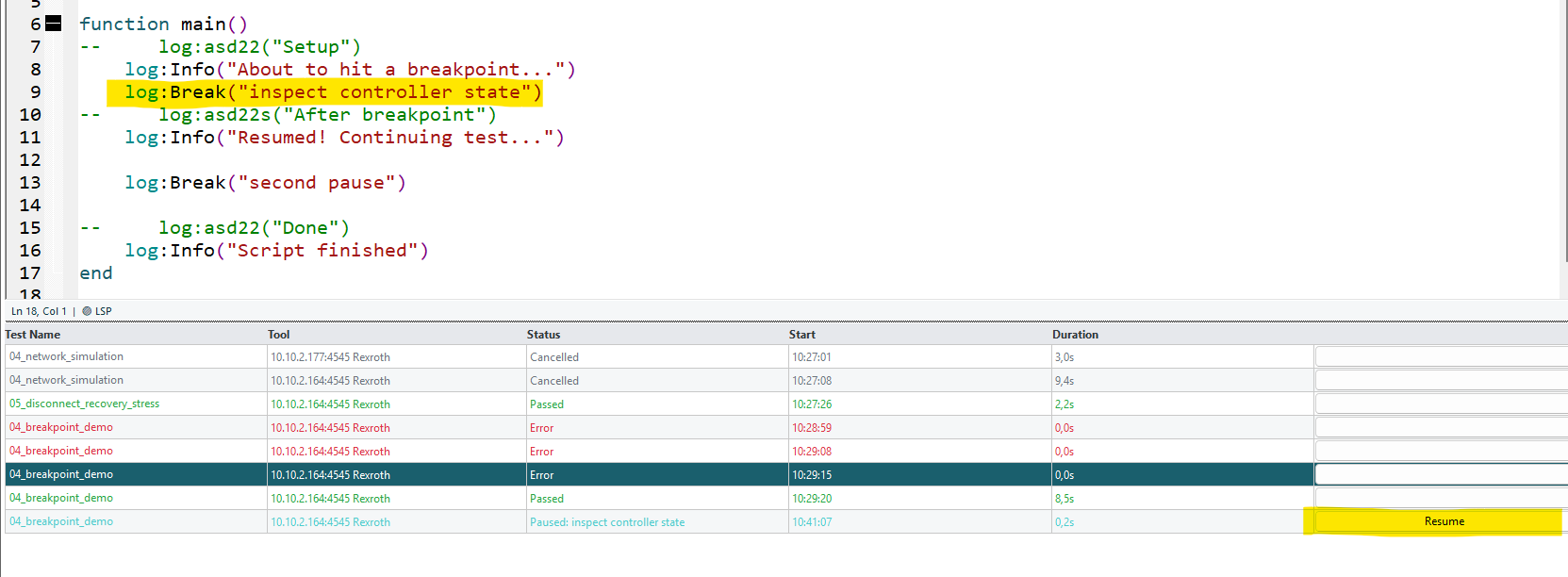
Pause script execution for manual inspection:
log:Break("inspect before tightening")    -- pauses until user clicks Resume
log:Break()                                -- default label: "breakpoint"
Breakpoints have a 5-minute auto-resume timeout.
Multi-Tool Testing
Use createSession() to connect to multiple controllers simultaneously:
function main()
    log:Step("Connect to primary tool")
    session:Connect("10.10.2.177", 4545, "OpenProtocol_Rexroth")
    session:Handshake()

    log:Step("Connect to second tool")
    local tool2 = createSession()
    tool2:Connect("10.10.2.178", 4545, "OpenProtocol_BMW")
    tool2:Handshake()

    log:Step("Run both tools")
    session:SelectJob(12)
    tool2:SelectJob(5)

    session:Disconnect()
    tool2:Disconnect()
end
Each session has its own TCP connection and message queue.
Network Simulation
Simulate poor network conditions before connecting:
Built-In Profiles
session:SetNetworkProfile("poor_radio")     -- 200ms send, 300ms recv, 150ms jitter
session:SetNetworkProfile("slow_station")   -- 0ms send, 2000ms recv, 500ms jitter
session:SetNetworkProfile("disconnect_after_3")  -- drops after 3 messages
session:SetNetworkProfile("normal")         -- no simulation (default)
Custom Profile
session:SetNetworkProfileCustom({
    sendDelayMs = 100,
    receiveDelayMs = 150,
    jitterMs = 50,
    packetLossPercent = 5.0,
    disconnectAfterMessages = 0
})
session:Connect()
Sandbox & Unrestricted Mode
By default, scripts run in SoftSandbox mode — io, os.execute, require, etc. are blocked.
To enable unrestricted mode (per workspace):
- Check "Unrestricted Lua" in the Test Suites toolbar
- Confirm the security warning
- This unlocks
os.*,io.*,require,dofile,loadfile
Warning: Only enable unrestricted mode for scripts you trust.
Error Handling
| Exception | Test Status | Cause |
|---|---|---|
| Assertion failure | Failed | Any assert:* call |
| Timeout | Failed | WaitForMid / Handshake timeout |
| User cancellation | Cancelled | Click Stop |
| Already connected | Error | Connect() called twice |
| Lua runtime error | Error | Syntax error, nil reference |
Tips
- Always define
function main()— the engine won't find your script otherwise - Use
log:Step()liberally — aim for 3–10 steps per test - Timeouts are in milliseconds —
5000= 5 seconds - Field values are always strings — use
tonumber()for numeric comparisons - Define helpers above
main()— Lua processes top-to-bottom - Auto-reconnect is built in — dropped connections are recovered automatically
print()works — it routes tolog:Debug()